Usually sites with denser user activity, more demanding wireless expectations, more structured network requirements or recurring issues with roaming and coverage consistency.
ruckus installer singapore • enterprise wifi singapore • commercial wireless
deployment • access point planning • network infrastructure
RUCKUS Installer Singapore — Enterprise WiFi Design, Deployment & Support
Build a stronger business wireless environment with better access point planning, cleaner roaming, stronger network segmentation and a deployment approach shaped around how the site is actually used.
Looking for a RUCKUS installer in Singapore? HAP supports enterprise WiFi projects for offices, hospitality spaces, schools, warehouses and demanding commercial environments that need more than a basic router-led setup.
Site survey
AP planning
Wired backhaul
Guest access
VLAN structure
Support-ready

Enterprise WiFi Hardware Direction
The hardware matters, but only when it is matched to the site properly. A good deployment starts with the right access point type, placement logic and management approach.
EXPLORE WIFI INSTALLATION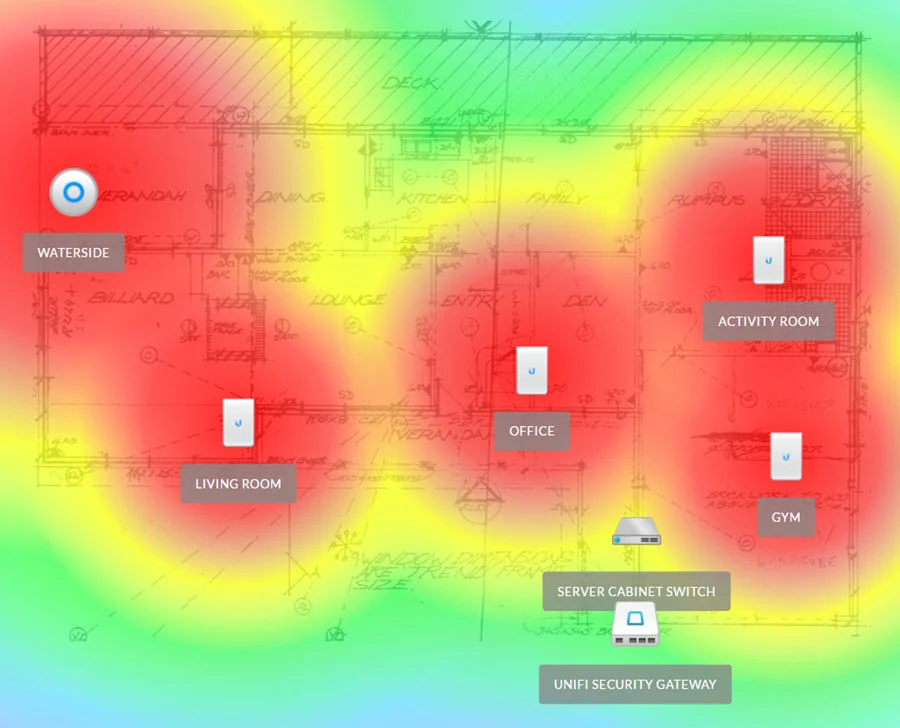
WiFi Design & Access Point Planning
Better wireless outcomes usually start with floor plan review, AP placement logic and coverage mapping — not just adding more devices.
EXPLORE NETWORK PLANNING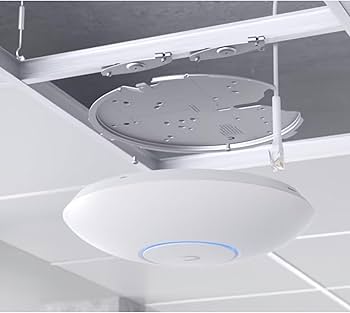
Wired Backbone & AP Installation
Stable enterprise WiFi depends heavily on proper wired support, clean cable routing, stronger backhaul and installation that can scale with the site.
EXPLORE DATA POINT & CABLING SUPPORTWho This Page Is For — And When RUCKUS May Actually Be Overkill
This makes the buying intent clearer and helps the page read like a serious advisory page rather than a generic brand page.
Best fit
Sites that benefit from a more serious wireless design
- Offices with many simultaneous users, meeting rooms or roaming-heavy work patterns
- Hospitality, clubs or guest-facing sites where wireless experience affects perception
- Warehouses, schools and commercial buildings with bigger footprints or awkward layouts
- Sites with weak roaming, unstable coverage or a messy WiFi environment that grew without a plan
- Projects that also need structured cabling, cleaner backhaul and support clarity
This page is strongest when the client needs better planning, not just another access point.
May not be necessary
Situations where a simpler approach may be enough
- Very small sites with simple usage and no real roaming or segmentation requirement
- Spaces where broadband issues are the real bottleneck, not WiFi design
- Projects where the main issue is just one dead zone that can be solved with better existing WiFi tuning
- Budgets that are better matched to simpler ecosystems like Omada or UniFi
That honesty helps this page convert better, because it shows the recommendation should follow the site, not the logo.
RUCKUS WiFi Deployment Singapore: Better Coverage Planning, Cleaner Roaming & More Reliable Business Wireless
A stronger wireless environment is usually the result of better design discipline, proper wired support and cleaner implementation — not just stronger hardware.
Site survey and access point planning
A proper deployment starts with how the site behaves in real use. Coverage zones, user concentration, wall materials, layout constraints and roaming paths all shape where access points should go and how the network should be designed.
For broader planning context, you can also explore whole-home WiFi, larger multi-storey WiFi projects, and existing weak coverage troubleshooting.
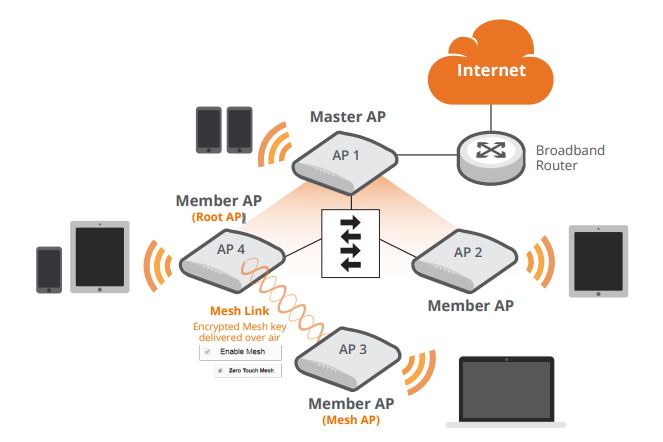
Guest access, VLAN structure and operational segmentation
In many commercial environments, signal strength is only part of the picture. The network also needs cleaner separation between guests, staff, critical devices and business operations so the site is easier to manage over time.
This is where data points and structured cabling, remote support workflows, and a more centralised network architecture become more valuable.
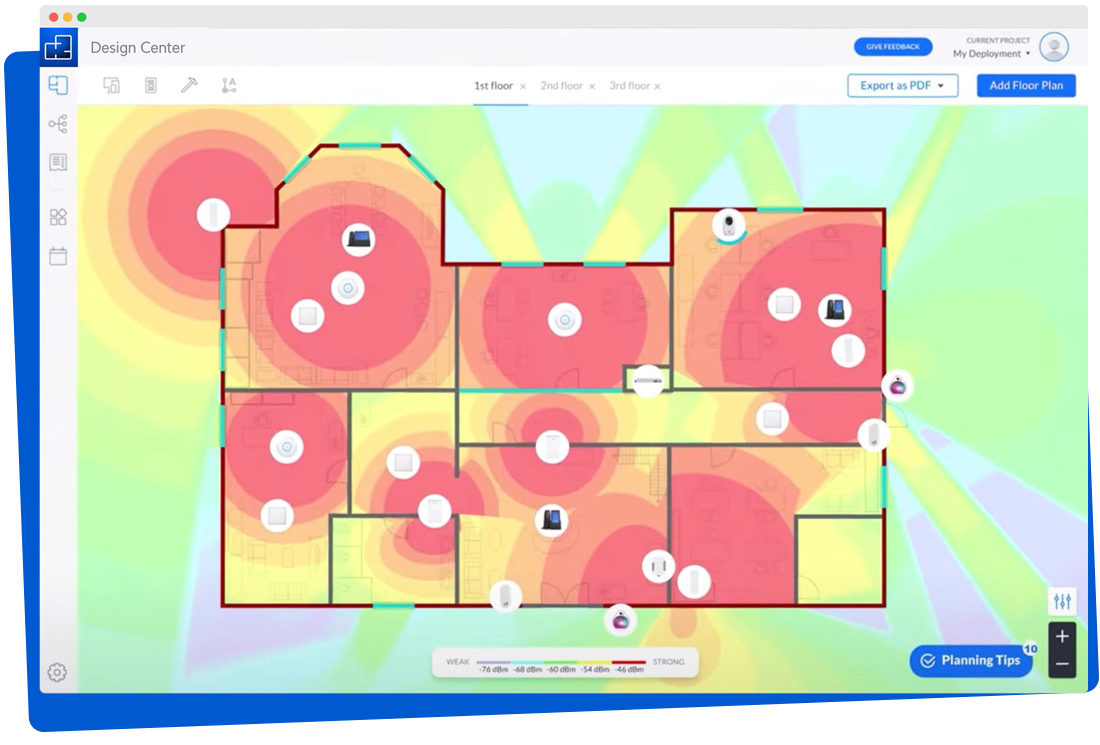
A better fit for demanding sites in Singapore
RUCKUS is often considered when the site is harder to serve well with a basic wireless approach — whether because of user density, operational requirements, layout complexity or the need for a more structured deployment and support path.
- Useful for offices, hospitality spaces, schools and commercial sites
- Better suited to wireless planning that prioritises consistency and manageability
- Works best when paired with proper switching, cabling and deployment coordination
If the site is part of a wider integration scope, HAP also has relevant pages around Omada network installation, UniFi business WiFi, and certified technical expertise.

Common Network Mistakes We Fix
This is where the page starts sounding like a specialist page instead of a broad brochure.
Too many APs in the wrong places
More hardware does not automatically mean better WiFi. Bad overlap and poor placement can make the experience worse.
Weak wired backhaul
A premium wireless design still fails if the data points, switch capacity or cable paths were never planned properly.
No real guest/staff separation
Many sites run everything flat on the same network, which hurts manageability, troubleshooting and longer-term security structure.
Treating broadband speed as the only issue
A fast internet plan does not fix poor roaming, weak signal quality, bad AP density, or a badly structured network environment.
RUCKUS Deployment Singapore — Controller-Less, Centralised & Cloud-Managed Approaches
The right architecture depends on site scale, operational preference and how much visibility the client wants after deployment.
Best for smaller environments
RUCKUS Unleashed / simpler controller-less approach
Suitable for smaller or more straightforward business sites that want stronger wireless performance without unnecessary platform complexity.
- Cleaner setup for simpler environments
- Good when operational requirements are more focused
- Still benefits from proper AP and network planning
Best for structured business networks
SmartZone / more centralised on-prem management
Better suited to larger or more controlled environments where the wireless layer needs deeper structure, clearer policy control and stronger network governance.
- Useful for larger commercial or multi-zone sites
- Supports more structured management practices
- Better fit when the deployment needs tighter coordination
Best for multi-site visibility
RUCKUS One / cloud-managed operations
A strong fit for organisations that want cleaner remote visibility, easier oversight across one or multiple sites, and a more modern support workflow.
For comparison pages and adjacent ecosystems, HAP also covers Ubiquiti UniFi products and Omada deployments.
Next step
Request a RUCKUS Consultation (Singapore)
Share your floor plan, current pain points and site type. We'll review the wireless requirements, likely coverage concerns and the most suitable deployment approach for the project.
What to send: floor plan, current network issues, site usage notes, number
of levels or key zones
What you get: recommended deployment direction, planning advice and
next-step project scope
Prefer WhatsApp? Share your details and we'll contact you.
RUCKUS vs UniFi vs Omada — Typical Buyer Fit
This is not about saying one is universally “best”. It is about where each option tends to make the most sense.
| Platform | Usually a stronger fit when… | Typical buyer priority | Important note |
|---|---|---|---|
| RUCKUS | The RF environment is tougher, roaming behaviour matters more, or the client wants a more serious deployment structure. | Stability, planning quality, higher-expectation wireless environments. | Best when the project is treated as a full deployment problem, not just a hardware purchase. |
| UniFi | The buyer wants a familiar ecosystem with broad adoption across SMB and prosumer-style deployments. | Interface familiarity, ecosystem breadth, clean controller-led setup. | Often strong value, but outcomes still depend heavily on placement, wired backbone and segmentation. |
| Omada | The site needs a more budget-aware controller-led business network without overcomplicating the deployment. | Cost control, central visibility, practical SMB rollout. | Can be the better fit where requirements are real but not extremely demanding. |
The real deciding factor is not the brand alone. It is site type, cable paths, roaming
expectations, user density, segmentation needs and how the client wants the network supported
after handover.
What Affects Project Cost
This section helps convert commercial visitors because it answers a real buying question directly instead of dodging it.
| Cost driver | Why it changes the scope |
|---|---|
| Site size and shape | Larger, irregular or multi-zone environments usually require more planning, validation and more disciplined AP placement. |
| Number of APs required | More coverage zones or denser user areas can increase both hardware and installation scope. |
| Existing cabling and LAN points | If data points are missing, badly located or need corrective work, wired backbone scope goes up. |
| PoE switching and cabinet readiness | Some environments need switching upgrades, cleaner patching or better power/network coordination. |
| Segmentation and guest WiFi requirements | More structured SSID, VLAN and policy design usually means more configuration and validation work. |
| Support, testing and handover expectations | More serious projects usually expect better documentation, more testing, clearer support readiness and smoother handover. |
Useful Proof, Trust Signals & Supporting Work
This is where the page stops sounding like polished filler and starts grounding itself in related deployment work and technical depth.
Project proof
Relevant network and integration project pages
These help show that HAP already works in environments where structured networking and access point planning matter.
Technical depth
Pages that reinforce deployment logic
These internal pages support the "wired backbone matters" story instead of leaving the page as a WiFi-only sales pitch.
Authority
Why the company side matters too
Technical pages rank better when users can also verify who is behind the work, how support works and whether the company looks credible.
Complete Guide: RUCKUS Installer Singapore — Enterprise WiFi Planning, Deployment, Migration & Support
A practical overview to help clients understand design logic, deployment options, budget drivers and what a proper implementation workflow should look like.
Key Takeaways
| Question | Answer |
|---|---|
| What is the page really about? | A service-led RUCKUS deployment approach for business sites that need stronger wireless design, not just equipment supply. |
| Who is it best suited for? | Offices, hospitality environments, schools, warehouses and other commercial spaces with higher expectations for wireless stability and manageability. |
| What affects the outcome most? | Site review, AP placement, roaming design, segmentation, infrastructure readiness and post-install tuning. |
| What affects pricing most? | Site size, access point quantity, switching and PoE requirements, cabling scope, management approach and project complexity. |
| What should a proper integrator handle? | Planning, infrastructure coordination, configuration, testing, handover and support clarity — not just product supply. |
What a stronger rollout usually looks like
- Consult: review the site, wireless problems and business requirements
- Design: map AP placement, coverage zones, segmentation and infrastructure needs
- Coordinate: align cabling, switching, rack or ceiling constraints and installation flow
- Install: deploy hardware and configure the network environment
- Test: validate real-world behaviour and refine where needed
- Handover: guide the client on the setup, support path and future scaling direction
Related HAP Network, Support & Knowledge Pages
These internal pages reinforce the wider cluster around WiFi, structured cabling, troubleshooting, alternative ecosystems and support readiness.
RUCKUS Installer Singapore FAQ — Enterprise WiFi Design, Deployment, Migration & Support
Tap a question to view the answer.
FAQ
RUCKUS Installer Singapore FAQ — Enterprise WiFi Design, Deployment, Migration & Support
Answers to common questions about RUCKUS enterprise WiFi design, deployment, migration, support, roaming, access point planning, and network structure in Singapore.
No. Better results usually come from stronger design, cleaner placement, better segmentation and proper infrastructure coordination.
Yes, when the environment is designed properly. In many projects, the improvement comes from better planning and implementation quality rather than hardware alone.
A proper project should cover planning, infrastructure coordination, configuration, testing and handover — not just supply.
Yes. Many projects involve cleaning up an older or mixed environment so the new network is more structured and easier to support.
Usually site size, access point quantity, switching requirements, cabling scope, management approach and the overall complexity of the environment.
Yes. Those are exactly the kinds of environments where wireless design discipline, user consistency and operational structure matter more.
A floor plan, site photos, current pain points, number of levels or major zones, and a rough idea of how users and devices behave in the space.
Not always. Some sites can reuse existing structured cabling, but larger or older environments often need new or corrected LAN points to support proper backhaul and cleaner access point placement.
It depends on the layout, ceiling type, coverage intent and cable path. In many projects, the right answer comes from the floor plan and site constraints rather than one fixed rule.
Yes. That is usually part of a proper business network design, especially when the client wants cleaner traffic separation, better security and clearer operational control.
Yes. That is why the internal links also connect into HAP’s adjacent network pages, so users comparing ecosystems can keep exploring without leaving the cluster.
The structure of this page is written for commercial and enterprise intent, but many of the design principles still overlap with larger premium residential projects that need stable roaming and stronger infrastructure.
Common causes include poor access point placement, weak roaming behaviour, bad backhaul, poor signal overlap, insufficient segmentation or a site that was never designed properly for its size and usage.
It usually depends on scale, user density, how many zones need to be managed, whether the site is likely to grow, and how much visibility or policy control the client wants after handover.
Often, yes. If the real issue is poor AP placement, bad roaming, weak backhaul or poor segmentation, fixing the network design can improve the user experience more than simply upgrading the internet plan.
Get a RUCKUS Consultation in Singapore — Site Review, Wireless Planning & Deployment Guidance
Share your floor plan, site type and current network pain points. We'll review the likely deployment direction, planning priorities and the right next step for the project.
ruckus installer singapore • enterprise wifi singapore • commercial wireless
deployment • access point planning • network infrastructure
RUCKUS Installer Singapore — Enterprise WiFi Design, Deployment & Support
Build a stronger business wireless environment with better access point planning, cleaner roaming, stronger network segmentation and a deployment approach shaped around how the site is actually used.
Looking for a RUCKUS installer in Singapore? HAP supports enterprise WiFi projects for offices, hospitality spaces, schools, warehouses and demanding commercial environments that need more than a basic router-led setup.
Site survey
AP planning
Wired backhaul
Guest access
VLAN structure
Support-ready
Enterprise WiFi Hardware Direction
The hardware matters, but only when it is matched to the site properly. A good deployment starts with the right access point type, placement logic and management approach.
EXPLORE WIFI INSTALLATION
WiFi Design & Access Point Planning
Better wireless outcomes usually start with floor plan review, AP placement logic and coverage mapping — not just adding more devices.
EXPLORE NETWORK PLANNING
Wired Backbone & AP Installation
Stable enterprise WiFi depends heavily on proper wired support, clean cable routing, stronger backhaul and installation that can scale with the site.
EXPLORE DATA POINT & CABLING SUPPORTWho This Page Is For — And When RUCKUS May Actually Be Overkill
This makes the buying intent clearer and helps the page read like a serious advisory page rather than a generic brand page.
Best fit
Sites that benefit from a more serious wireless design
- Offices with many simultaneous users, meeting rooms or roaming-heavy work patterns
- Hospitality, clubs or guest-facing sites where wireless experience affects perception
- Warehouses, schools and commercial buildings with bigger footprints or awkward layouts
- Sites with weak roaming, unstable coverage or a messy WiFi environment that grew without a plan
- Projects that also need structured cabling, cleaner backhaul and support clarity
This page is strongest when the client needs better planning, not just another access point.
May not be necessary
Situations where a simpler approach may be enough
- Very small sites with simple usage and no real roaming or segmentation requirement
- Spaces where broadband issues are the real bottleneck, not WiFi design
- Projects where the main issue is just one dead zone that can be solved with better existing WiFi tuning
- Budgets that are better matched to simpler ecosystems like Omada or UniFi
That honesty helps this page convert better, because it shows the recommendation should follow the site, not the logo.
RUCKUS WiFi Deployment Singapore: Better Coverage Planning, Cleaner Roaming & More Reliable Business Wireless
A stronger wireless environment is usually the result of better design discipline, proper wired support and cleaner implementation — not just stronger hardware.
Site survey and access point planning
A proper deployment starts with how the site behaves in real use. Coverage zones, user concentration, wall materials, layout constraints and roaming paths all shape where access points should go and how the network should be designed.
For broader planning context, you can also explore whole-home WiFi, larger multi-storey WiFi projects, and existing weak coverage troubleshooting.
Guest access, VLAN structure and operational segmentation
In many commercial environments, signal strength is only part of the picture. The network also needs cleaner separation between guests, staff, critical devices and business operations so the site is easier to manage over time.
This is where data points and structured cabling, remote support workflows, and a more centralised network architecture become more valuable.
A better fit for demanding sites in Singapore
RUCKUS is often considered when the site is harder to serve well with a basic wireless approach — whether because of user density, operational requirements, layout complexity or the need for a more structured deployment and support path.
- Useful for offices, hospitality spaces, schools and commercial sites
- Better suited to wireless planning that prioritises consistency and manageability
- Works best when paired with proper switching, cabling and deployment coordination
If the site is part of a wider integration scope, HAP also has relevant pages around Omada network installation, UniFi business WiFi, and certified technical expertise.
Common Network Mistakes We Fix
This is where the page starts sounding like a specialist page instead of a broad brochure.
Too many APs in the wrong places
More hardware does not automatically mean better WiFi. Bad overlap and poor placement can make the experience worse.
Weak wired backhaul
A premium wireless design still fails if the data points, switch capacity or cable paths were never planned properly.
No real guest/staff separation
Many sites run everything flat on the same network, which hurts manageability, troubleshooting and longer-term security structure.
Treating broadband speed as the only issue
A fast internet plan does not fix poor roaming, weak signal quality, bad AP density, or a badly structured network environment.
RUCKUS Deployment Singapore — Controller-Less, Centralised & Cloud-Managed Approaches
The right architecture depends on site scale, operational preference and how much visibility the client wants after deployment.
Best for smaller environments
RUCKUS Unleashed / simpler controller-less approach
Suitable for smaller or more straightforward business sites that want stronger wireless performance without unnecessary platform complexity.
- Cleaner setup for simpler environments
- Good when operational requirements are more focused
- Still benefits from proper AP and network planning
Best for structured business networks
SmartZone / more centralised on-prem management
Better suited to larger or more controlled environments where the wireless layer needs deeper structure, clearer policy control and stronger network governance.
- Useful for larger commercial or multi-zone sites
- Supports more structured management practices
- Better fit when the deployment needs tighter coordination
Best for multi-site visibility
RUCKUS One / cloud-managed operations
A strong fit for organisations that want cleaner remote visibility, easier oversight across one or multiple sites, and a more modern support workflow.
For comparison pages and adjacent ecosystems, HAP also covers Ubiquiti UniFi products and Omada deployments.
Next step
Request a RUCKUS Consultation (Singapore)
Share your floor plan, current pain points and site type. We'll review the wireless requirements, likely coverage concerns and the most suitable deployment approach for the project.
What to send: floor plan, current network issues, site usage notes, number
of levels or key zones
What you get: recommended deployment direction, planning advice and
next-step project scope
Prefer WhatsApp? Share your details and we'll contact you.
RUCKUS vs UniFi vs Omada — Typical Buyer Fit
This is not about saying one is universally “best”. It is about where each option tends to make the most sense.
| Platform | Usually a stronger fit when… | Typical buyer priority | Important note |
|---|---|---|---|
| RUCKUS | The RF environment is tougher, roaming behaviour matters more, or the client wants a more serious deployment structure. | Stability, planning quality, higher-expectation wireless environments. | Best when the project is treated as a full deployment problem, not just a hardware purchase. |
| UniFi | The buyer wants a familiar ecosystem with broad adoption across SMB and prosumer-style deployments. | Interface familiarity, ecosystem breadth, clean controller-led setup. | Often strong value, but outcomes still depend heavily on placement, wired backbone and segmentation. |
| Omada | The site needs a more budget-aware controller-led business network without overcomplicating the deployment. | Cost control, central visibility, practical SMB rollout. | Can be the better fit where requirements are real but not extremely demanding. |
The real deciding factor is not the brand alone. It is site type, cable paths, roaming
expectations, user density, segmentation needs and how the client wants the network supported
after handover.
What Affects Project Cost
This section helps convert commercial visitors because it answers a real buying question directly instead of dodging it.
| Cost driver | Why it changes the scope |
|---|---|
| Site size and shape | Larger, irregular or multi-zone environments usually require more planning, validation and more disciplined AP placement. |
| Number of APs required | More coverage zones or denser user areas can increase both hardware and installation scope. |
| Existing cabling and LAN points | If data points are missing, badly located or need corrective work, wired backbone scope goes up. |
| PoE switching and cabinet readiness | Some environments need switching upgrades, cleaner patching or better power/network coordination. |
| Segmentation and guest WiFi requirements | More structured SSID, VLAN and policy design usually means more configuration and validation work. |
| Support, testing and handover expectations | More serious projects usually expect better documentation, more testing, clearer support readiness and smoother handover. |
Useful Proof, Trust Signals & Supporting Work
This is where the page stops sounding like polished filler and starts grounding itself in related deployment work and technical depth.
Project proof
Relevant network and integration project pages
These help show that HAP already works in environments where structured networking and access point planning matter.
Technical depth
Pages that reinforce deployment logic
These internal pages support the "wired backbone matters" story instead of leaving the page as a WiFi-only sales pitch.
Authority
Why the company side matters too
Technical pages rank better when users can also verify who is behind the work, how support works and whether the company looks credible.
Complete Guide: RUCKUS Installer Singapore — Enterprise WiFi Planning, Deployment, Migration & Support
A practical overview to help clients understand design logic, deployment options, budget drivers and what a proper implementation workflow should look like.
Key Takeaways
| Question | Answer |
|---|---|
| What is the page really about? | A service-led RUCKUS deployment approach for business sites that need stronger wireless design, not just equipment supply. |
| Who is it best suited for? | Offices, hospitality environments, schools, warehouses and other commercial spaces with higher expectations for wireless stability and manageability. |
| What affects the outcome most? | Site review, AP placement, roaming design, segmentation, infrastructure readiness and post-install tuning. |
| What affects pricing most? | Site size, access point quantity, switching and PoE requirements, cabling scope, management approach and project complexity. |
| What should a proper integrator handle? | Planning, infrastructure coordination, configuration, testing, handover and support clarity — not just product supply. |
What a stronger rollout usually looks like
- Consult: review the site, wireless problems and business requirements
- Design: map AP placement, coverage zones, segmentation and infrastructure needs
- Coordinate: align cabling, switching, rack or ceiling constraints and installation flow
- Install: deploy hardware and configure the network environment
- Test: validate real-world behaviour and refine where needed
- Handover: guide the client on the setup, support path and future scaling direction
Related HAP Network, Support & Knowledge Pages
These internal pages reinforce the wider cluster around WiFi, structured cabling, troubleshooting, alternative ecosystems and support readiness.
RUCKUS Installer Singapore FAQ — Enterprise WiFi Design, Deployment, Migration & Support
Tap a question to view the answer.
FAQ
RUCKUS Installer Singapore FAQ — Enterprise WiFi Design, Deployment, Migration & Support
Answers to common questions about RUCKUS enterprise WiFi design, deployment, migration, support, roaming, access point planning, and network structure in Singapore.
Usually sites with denser user activity, more demanding wireless expectations, more structured network requirements or recurring issues with roaming and coverage consistency.
No. Better results usually come from stronger design, cleaner placement, better segmentation and proper infrastructure coordination.
Yes, when the environment is designed properly. In many projects, the improvement comes from better planning and implementation quality rather than hardware alone.
A proper project should cover planning, infrastructure coordination, configuration, testing and handover — not just supply.
Yes. Many projects involve cleaning up an older or mixed environment so the new network is more structured and easier to support.
Usually site size, access point quantity, switching requirements, cabling scope, management approach and the overall complexity of the environment.
Yes. Those are exactly the kinds of environments where wireless design discipline, user consistency and operational structure matter more.
A floor plan, site photos, current pain points, number of levels or major zones, and a rough idea of how users and devices behave in the space.
Not always. Some sites can reuse existing structured cabling, but larger or older environments often need new or corrected LAN points to support proper backhaul and cleaner access point placement.
It depends on the layout, ceiling type, coverage intent and cable path. In many projects, the right answer comes from the floor plan and site constraints rather than one fixed rule.
Yes. That is usually part of a proper business network design, especially when the client wants cleaner traffic separation, better security and clearer operational control.
Yes. That is why the internal links also connect into HAP’s adjacent network pages, so users comparing ecosystems can keep exploring without leaving the cluster.
The structure of this page is written for commercial and enterprise intent, but many of the design principles still overlap with larger premium residential projects that need stable roaming and stronger infrastructure.
Common causes include poor access point placement, weak roaming behaviour, bad backhaul, poor signal overlap, insufficient segmentation or a site that was never designed properly for its size and usage.
It usually depends on scale, user density, how many zones need to be managed, whether the site is likely to grow, and how much visibility or policy control the client wants after handover.
Often, yes. If the real issue is poor AP placement, bad roaming, weak backhaul or poor segmentation, fixing the network design can improve the user experience more than simply upgrading the internet plan.
Get a RUCKUS Consultation in Singapore — Site Review, Wireless Planning & Deployment Guidance
Share your floor plan, site type and current network pain points. We'll review the likely deployment direction, planning priorities and the right next step for the project.