Home Networking Singapore — Whole-Home WiFi, Wired Networks & Professional Installation
Your internet plan is only one part of the system. HAP designs and installs the internal home network infrastructure—including routing, switching, wired access points, and connected-home integration—for reliable performance in every room.
- Wired Ethernet backbone
- Professional WiFi placement
- Smart-home integration ready
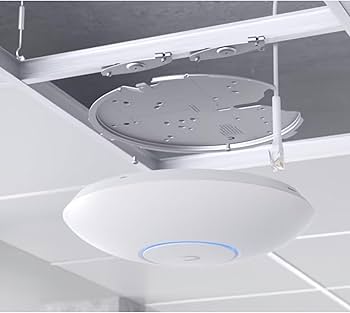
A fast broadband plan does not automatically mean a fast home network.
Your Internet Service Provider delivers the connection to your front door. How that connection is distributed throughout your home determines your actual daily experience. Without proper routing, switching, and structured wired access points, even a high-speed broadband plan can result in dead zones, dropped video calls, and unstable roaming. HAP bridges that gap by engineering a complete network system.
The Foundations of a HAP Home Network
1. Wired Backbone
Structured Ethernet cabling provides dedicated wired uplinks for access points and fixed devices, avoiding reliance on wireless backhaul.
2. WiFi Access Points
Strategically placed wired access points deliver cleaner room-to-room coverage and smoother roaming than relying on a single central router.
3. Routing & Switching
The core hardware that efficiently manages traffic, IP allocation, and device communication securely across your entire property.
4. Connected-Home Ready
A strong network foundation deliberately designed to reliably support smart-home automation, AV systems, CCTV, and intercoms.
How a Proper Home Network Flows
Home WiFi Packages Singapore
These are ready-made HAP configurations designed for typical residential apartment layouts. For larger properties, multi-storey homes or unusual floor plans, a custom network design may be more appropriate.
Basic Wi-Fi Package
- 1 × TP-Link ER7212PC Omada Router
- 2 × TP-Link AX3000 Wall Plate Wi-Fi 6 Access Point
- Standard onsite setup (1 trip)
Enhanced Wi-Fi Package
- 1 × TP-Link ER7212PC Omada Router
- 3 × TP-Link AX3000 Wall Plate Wi-Fi 6 Access Point
- Standard onsite setup (1 trip)
Premium Wi-Fi Package
- 1 × TP-Link ER7212PC Omada Router
- 4 × TP-Link AX3000 Wall Plate Wi-Fi 6 Access Point
- Standard onsite setup (1 trip)
All WiFi packages include a 1-year warranty on hardware components and workmanship, with remote support for troubleshooting.
Custom Home Network Design
For larger homes, unusual layouts, premium AV setups, and full smart-home integration, we design and install high-performance tailored network infrastructure based on your specific floor plan.
Wired Access Points vs Wireless Mesh
When upgrading home WiFi, understanding the underlying technology is important for setting the right expectations.
Wireless Mesh: Useful when running new cabling is entirely impractical. Nodes communicate wirelessly with each other to pass the signal along. This can be suitable for simpler retrofits, though each wireless hop generally reduces overall bandwidth.
Wired Access Points: Each AP connects directly back to the main network switch via a physical Ethernet cable. This can provide a more predictable foundation for larger or more demanding homes while avoiding the additional wireless backhaul used by fully wireless mesh layouts.
Explore whole-home WiFi concepts →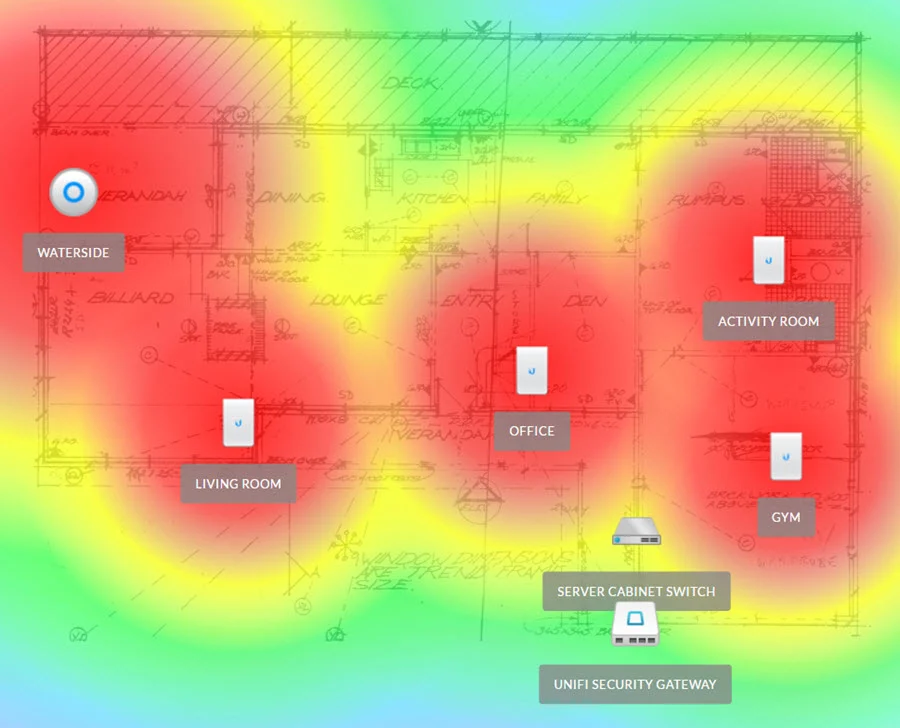
5Gbps & 10Gbps Broadband — Is Your Home Network Ready?
Upgrading your broadband speed alone does not guarantee faster WiFi on your phone or laptop. To fully utilize high-speed multi-gigabit plans, the internal infrastructure must be capable of handling it:
- Router WAN and LAN ports must support multi-gigabit speeds.
- Network switches must have sufficient backplane capacity.
- Ethernet cabling (e.g., Cat6/Cat6A) must be rated for the required throughput.
- WiFi access points and your actual client devices must support the latest standards to see a wireless difference.
HAP ensures your internal infrastructure is sized appropriately around your actual broadband requirements.
What Connects to a Proper Network?
A well-designed network securely and reliably supports the modern digital home.
Property-Type Fit
Apartments: Benefit from structured placement to overcome concrete walls.
Penthouses: Require zone-based planning across larger footprints.
Landed Homes: Demand robust wired backbones for multi-storey roaming. Read our guide to Landed Home WiFi Singapore.
Smart Home & AV
A modern home relies on the network for more than web browsing. It is the backbone for scenes, lighting, AV distribution, and security.
Planning the network early ensures these systems communicate reliably without dropping off. Explore whole-home automation.
UniFi Environments
Alongside standard packages, HAP supports performance-focused UniFi deployments where appropriate, providing advanced routing and wireless control.
Learn about our UniFi network setup services in Singapore.
Our Professional Installation Workflow
Reviewing your floor plan, current pain points, property type, and performance goals.
Planning access point placement, routing, and switching architecture tailored to your layout.
Working alongside your interior designer or contractor on structured cabling routes if required.
Deploying the network hardware, mounting access points, and securing the physical infrastructure.
Setting up the network logic, securing wireless access, and verifying coverage across zones.
Providing necessary network details and ensuring reliable day-to-day operation.
Home Networking FAQ
A home network is the complete infrastructure inside your property that allows devices to connect to each other and the internet. It includes the router, network switches, Ethernet cabling, and WiFi access points.
WiFi is simply the wireless signal your devices connect to. The home network is the physical underlying system (cables, switches, and routers) that generates and manages that WiFi signal and handles data traffic.
For stability and performance, yes. Wired access points connect directly back to the network switch via Ethernet, providing uncompromised bandwidth. Mesh relies on wireless signals hopping between nodes, which can degrade speed, though it remains useful for simpler retrofits.
This depends entirely on your floor plan, wall materials, and property size. HAP assesses these factors to recommend the optimal quantity and placement to minimize dead zones.
Yes, if your home already has functioning Ethernet wall points, we can often utilize them to connect wired access points or hardwire stationary devices like smart TVs.
If you are doing a renovation or building a new home, we highly recommend running new Cat6 or Cat6A cabling. If you are not renovating, we will design the best possible solution using your existing infrastructure.
No. A 10Gbps broadband plan does not mean a single phone or laptop will achieve 10Gbps over WiFi. Actual wireless throughput depends on the access point, channel width, client hardware, signal conditions and network design.
Yes. A professionally designed home network is the ideal foundation for integrating CCTV, intercoms, and smart-home automation securely and reliably.
Our standard packages generally include a primary router, a specified number of WiFi 6 access points, and standard onsite setup. Details are listed on the individual package pages.
Usually not. Landed homes typically require more extensive coverage planning, floor-to-floor roaming strategies, and customized hardware quantities. We recommend a custom consultation for these properties.
Yes. For complex layouts, high-performance AV environments, or whole-home automation integration, a custom network design is our recommended approach.
Planning a Better Home Network?
Talk to HAP about your property layout, existing network and performance requirements, or compare our ready-made home WiFi packages.
Home Networking Singapore — Whole-Home WiFi, Wired Networks & Professional Installation
Your internet plan is only one part of the system. HAP designs and installs the internal home network infrastructure—including routing, switching, wired access points, and connected-home integration—for reliable performance in every room.
- Wired Ethernet backbone
- Professional WiFi placement
- Smart-home integration ready
A fast broadband plan does not automatically mean a fast home network.
Your Internet Service Provider delivers the connection to your front door. How that connection is distributed throughout your home determines your actual daily experience. Without proper routing, switching, and structured wired access points, even a high-speed broadband plan can result in dead zones, dropped video calls, and unstable roaming. HAP bridges that gap by engineering a complete network system.
The Foundations of a HAP Home Network
1. Wired Backbone
Structured Ethernet cabling provides dedicated wired uplinks for access points and fixed devices, avoiding reliance on wireless backhaul.
2. WiFi Access Points
Strategically placed wired access points deliver cleaner room-to-room coverage and smoother roaming than relying on a single central router.
3. Routing & Switching
The core hardware that efficiently manages traffic, IP allocation, and device communication securely across your entire property.
4. Connected-Home Ready
A strong network foundation deliberately designed to reliably support smart-home automation, AV systems, CCTV, and intercoms.
How a Proper Home Network Flows
Home WiFi Packages Singapore
These are ready-made HAP configurations designed for typical residential apartment layouts. For larger properties, multi-storey homes or unusual floor plans, a custom network design may be more appropriate.
Basic Wi-Fi Package
- 1 × TP-Link ER7212PC Omada Router
- 2 × TP-Link AX3000 Wall Plate Wi-Fi 6 Access Point
- Standard onsite setup (1 trip)
Enhanced Wi-Fi Package
- 1 × TP-Link ER7212PC Omada Router
- 3 × TP-Link AX3000 Wall Plate Wi-Fi 6 Access Point
- Standard onsite setup (1 trip)
Premium Wi-Fi Package
- 1 × TP-Link ER7212PC Omada Router
- 4 × TP-Link AX3000 Wall Plate Wi-Fi 6 Access Point
- Standard onsite setup (1 trip)
All WiFi packages include a 1-year warranty on hardware components and workmanship, with remote support for troubleshooting.
Custom Home Network Design
For larger homes, unusual layouts, premium AV setups, and full smart-home integration, we design and install high-performance tailored network infrastructure based on your specific floor plan.
Wired Access Points vs Wireless Mesh
When upgrading home WiFi, understanding the underlying technology is important for setting the right expectations.
Wireless Mesh: Useful when running new cabling is entirely impractical. Nodes communicate wirelessly with each other to pass the signal along. This can be suitable for simpler retrofits, though each wireless hop generally reduces overall bandwidth.
Wired Access Points: Each AP connects directly back to the main network switch via a physical Ethernet cable. This can provide a more predictable foundation for larger or more demanding homes while avoiding the additional wireless backhaul used by fully wireless mesh layouts.
Explore whole-home WiFi concepts →
5Gbps & 10Gbps Broadband — Is Your Home Network Ready?
Upgrading your broadband speed alone does not guarantee faster WiFi on your phone or laptop. To fully utilize high-speed multi-gigabit plans, the internal infrastructure must be capable of handling it:
- Router WAN and LAN ports must support multi-gigabit speeds.
- Network switches must have sufficient backplane capacity.
- Ethernet cabling (e.g., Cat6/Cat6A) must be rated for the required throughput.
- WiFi access points and your actual client devices must support the latest standards to see a wireless difference.
HAP ensures your internal infrastructure is sized appropriately around your actual broadband requirements.
What Connects to a Proper Network?
A well-designed network securely and reliably supports the modern digital home.
Property-Type Fit
Apartments: Benefit from structured placement to overcome concrete walls.
Penthouses: Require zone-based planning across larger footprints.
Landed Homes: Demand robust wired backbones for multi-storey roaming. Read our guide to Landed Home WiFi Singapore.
Smart Home & AV
A modern home relies on the network for more than web browsing. It is the backbone for scenes, lighting, AV distribution, and security.
Planning the network early ensures these systems communicate reliably without dropping off. Explore whole-home automation.
UniFi Environments
Alongside standard packages, HAP supports performance-focused UniFi deployments where appropriate, providing advanced routing and wireless control.
Learn about our UniFi network setup services in Singapore.
Our Professional Installation Workflow
Reviewing your floor plan, current pain points, property type, and performance goals.
Planning access point placement, routing, and switching architecture tailored to your layout.
Working alongside your interior designer or contractor on structured cabling routes if required.
Deploying the network hardware, mounting access points, and securing the physical infrastructure.
Setting up the network logic, securing wireless access, and verifying coverage across zones.
Providing necessary network details and ensuring reliable day-to-day operation.
Home Networking FAQ
A home network is the complete infrastructure inside your property that allows devices to connect to each other and the internet. It includes the router, network switches, Ethernet cabling, and WiFi access points.
WiFi is simply the wireless signal your devices connect to. The home network is the physical underlying system (cables, switches, and routers) that generates and manages that WiFi signal and handles data traffic.
For stability and performance, yes. Wired access points connect directly back to the network switch via Ethernet, providing uncompromised bandwidth. Mesh relies on wireless signals hopping between nodes, which can degrade speed, though it remains useful for simpler retrofits.
This depends entirely on your floor plan, wall materials, and property size. HAP assesses these factors to recommend the optimal quantity and placement to minimize dead zones.
Yes, if your home already has functioning Ethernet wall points, we can often utilize them to connect wired access points or hardwire stationary devices like smart TVs.
If you are doing a renovation or building a new home, we highly recommend running new Cat6 or Cat6A cabling. If you are not renovating, we will design the best possible solution using your existing infrastructure.
No. A 10Gbps broadband plan does not mean a single phone or laptop will achieve 10Gbps over WiFi. Actual wireless throughput depends on the access point, channel width, client hardware, signal conditions and network design.
Yes. A professionally designed home network is the ideal foundation for integrating CCTV, intercoms, and smart-home automation securely and reliably.
Our standard packages generally include a primary router, a specified number of WiFi 6 access points, and standard onsite setup. Details are listed on the individual package pages.
Usually not. Landed homes typically require more extensive coverage planning, floor-to-floor roaming strategies, and customized hardware quantities. We recommend a custom consultation for these properties.
Yes. For complex layouts, high-performance AV environments, or whole-home automation integration, a custom network design is our recommended approach.
Planning a Better Home Network?
Talk to HAP about your property layout, existing network and performance requirements, or compare our ready-made home WiFi packages.