
📘 Knowledge Module
Path: Knowledge > Workstation > +
This is where you create informative articles for internal or customer-facing use.
✍️ How to Create an Article with ChatGPT:
Create a new article under the correct category (Knowledge > Workstation > +).
- Add parent article > child child article
Outline your structure:
Introduction
Step 1, Step 2, Step 3 (detailed instructions)
Tips/Best Practices
Send your outline or instructions to ChatGPT to help write the article.
Use Google or official product websites to fact-check and ensure the article is accurate and up-to-date.
Enhance the article by uploading: (To insert media or video, simply type / on a new line — you’ll be prompted with options to add)
✅ Images: Click the image icon in the editor
🎥 Videos: First upload your video to YouTube, then paste the shareable link into the article
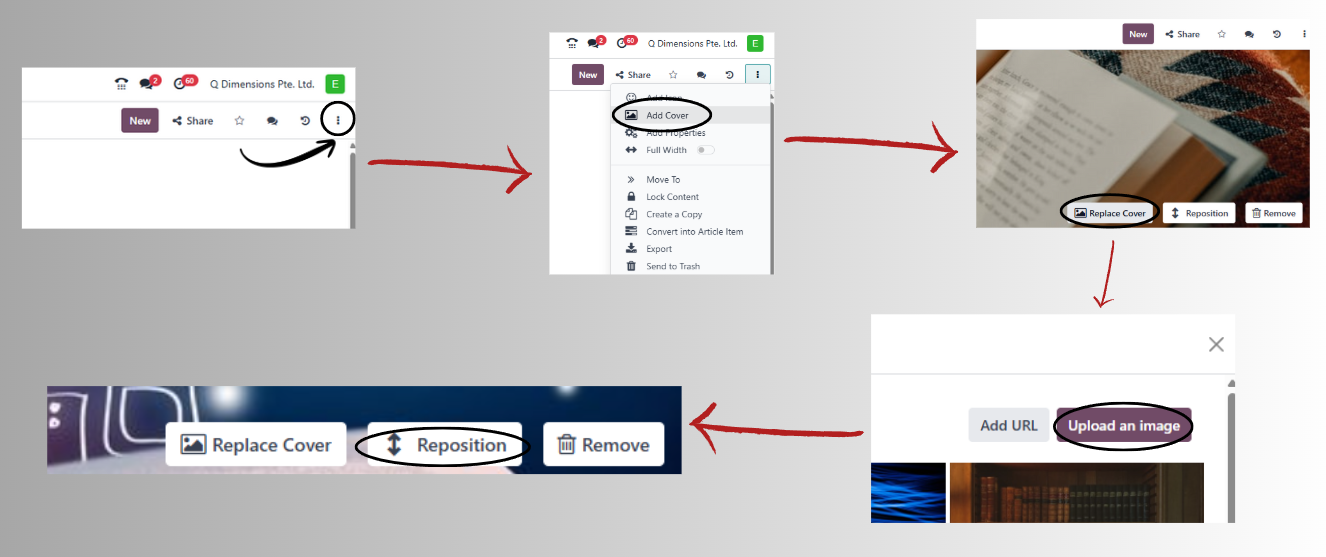
🖼️ Cover Image: Upload a banner or thumbnail from the article settings(click on the 3 dots on the top right side of the webpage and select add cover)* Be sure to reposition the cover photo to enhance the article’s visual appeal *.
Click “Publish” once the article is complete and reviewed.
🎥 Tutorial Video
💡 Tips & Best Practices
✅ Keep instructions short, simple, and numbered for easy reading
🧠 Always write as if the reader is a first-time user
🖋️ Use consistent formatting (same font size, icon style, etc.)